mirror of
https://github.com/alkimake/paperclip.git
synced 2026-06-14 01:50:39 +09:00
 778e775c35
## Thinking Path
> - Paperclip orchestrates AI-agent companies and needs secrets handling
to work across local development, hosted operators, and governed agent
execution.
> - The affected subsystem is the company-scoped secrets control plane:
database schema, server services/routes, CLI workflows, and the Secrets
settings UI.
> - The gap was that secrets were local-only and operators could not
manage provider vaults or import existing remote references without
exposing plaintext.
> - This branch adds provider vault configuration plus an AWS Secrets
Manager remote-import path while preserving company boundaries, binding
context, and audit trails.
> - I kept the PR to a single branch PR, removed unrelated
lockfile/package drift, rebased the full branch onto the current
`public-gh/master`, and addressed fresh Greptile findings.
> - The benefit is a reviewable implementation of provider-backed
secrets with focused tests covering provider selection, import
conflicts, deleted secret reuse, rotation guards, and AWS signing
behavior.
## What Changed
- Added provider vault support for company secrets, including provider
config storage, default vault handling, health checks, binding usage,
access events, and remote import preview/commit.
- Added an AWS Secrets Manager provider using SigV4 request signing,
bounded request timeouts, namespace guardrails, cached runtime
credential resolution, and external-reference linking without plaintext
reads.
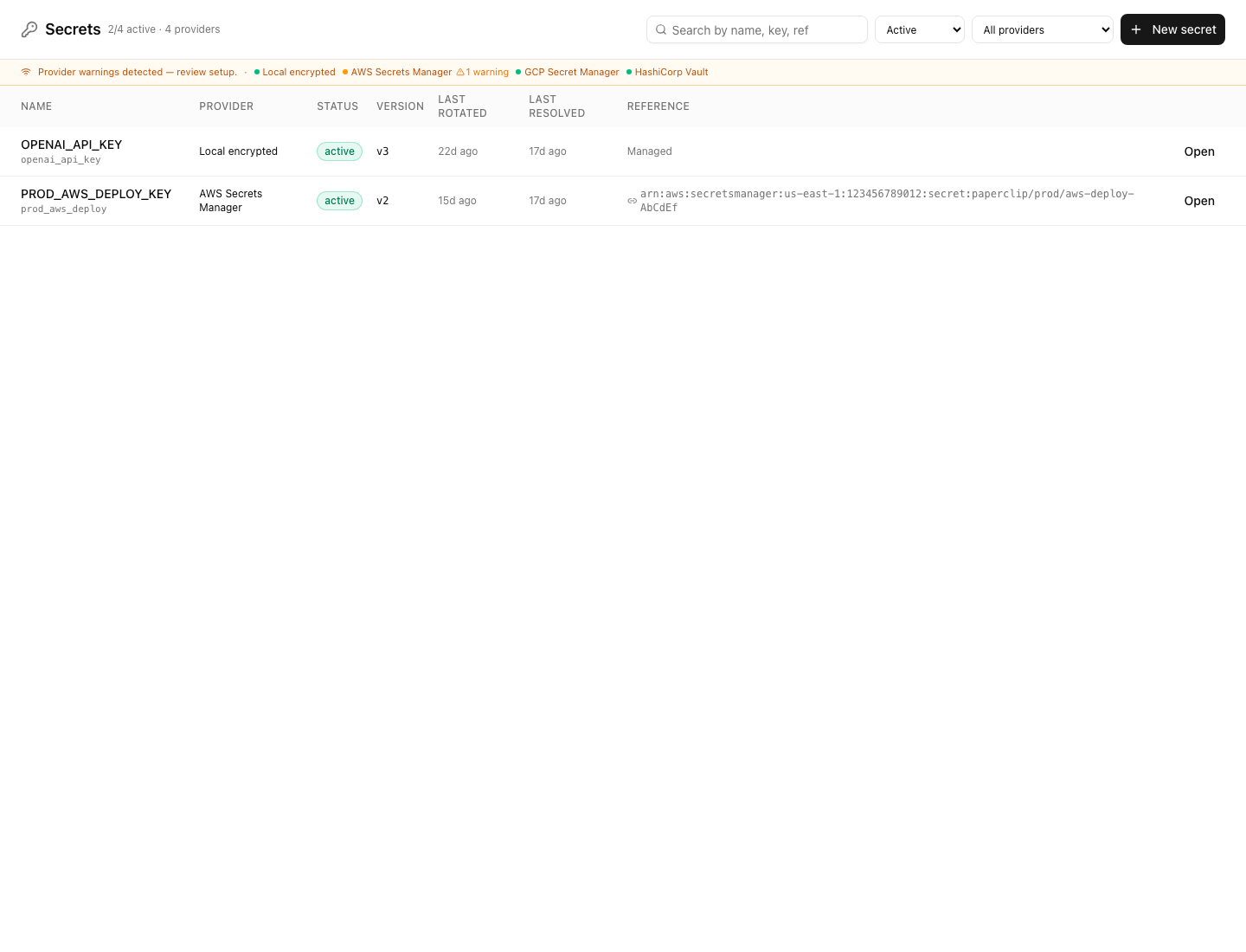
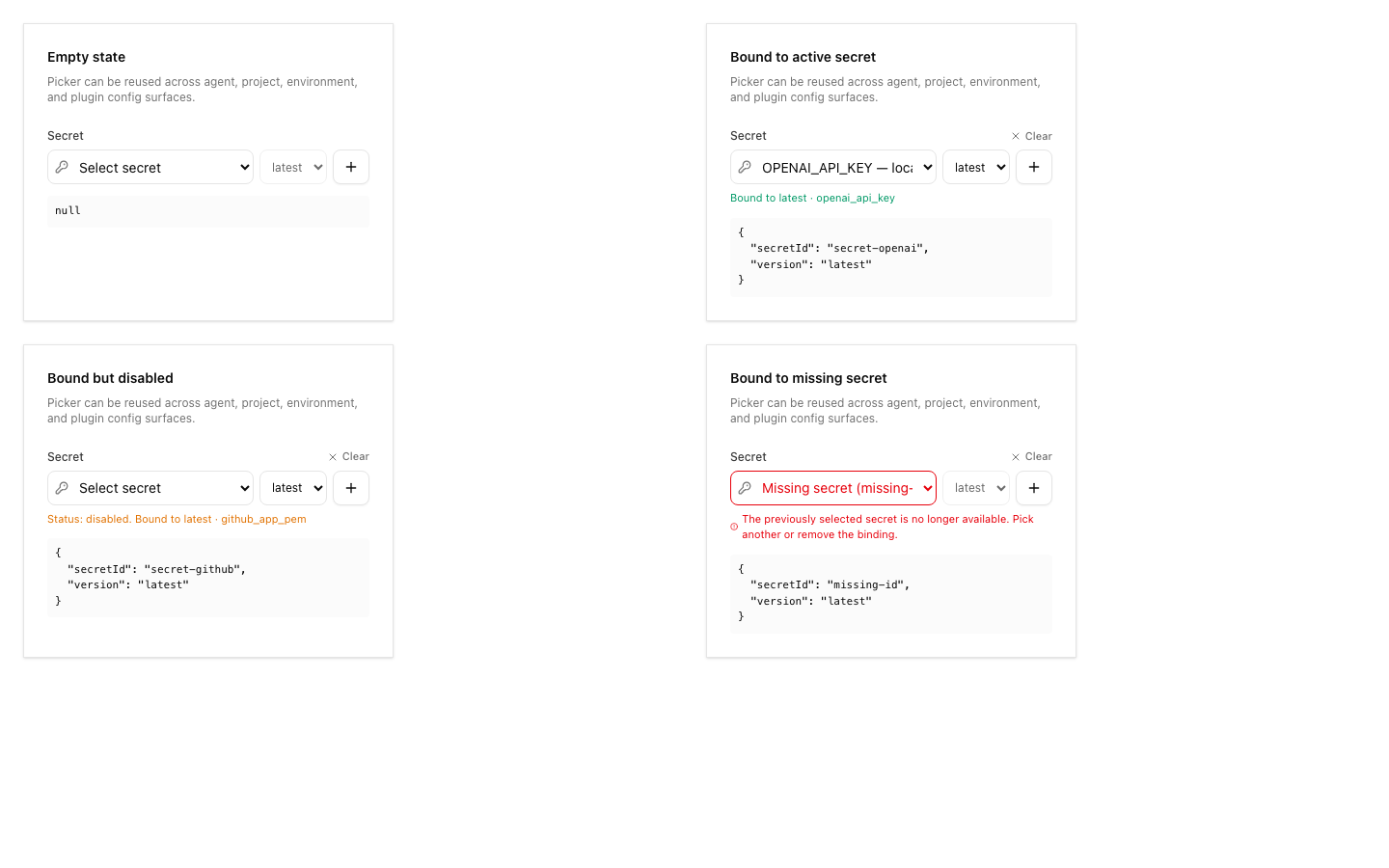
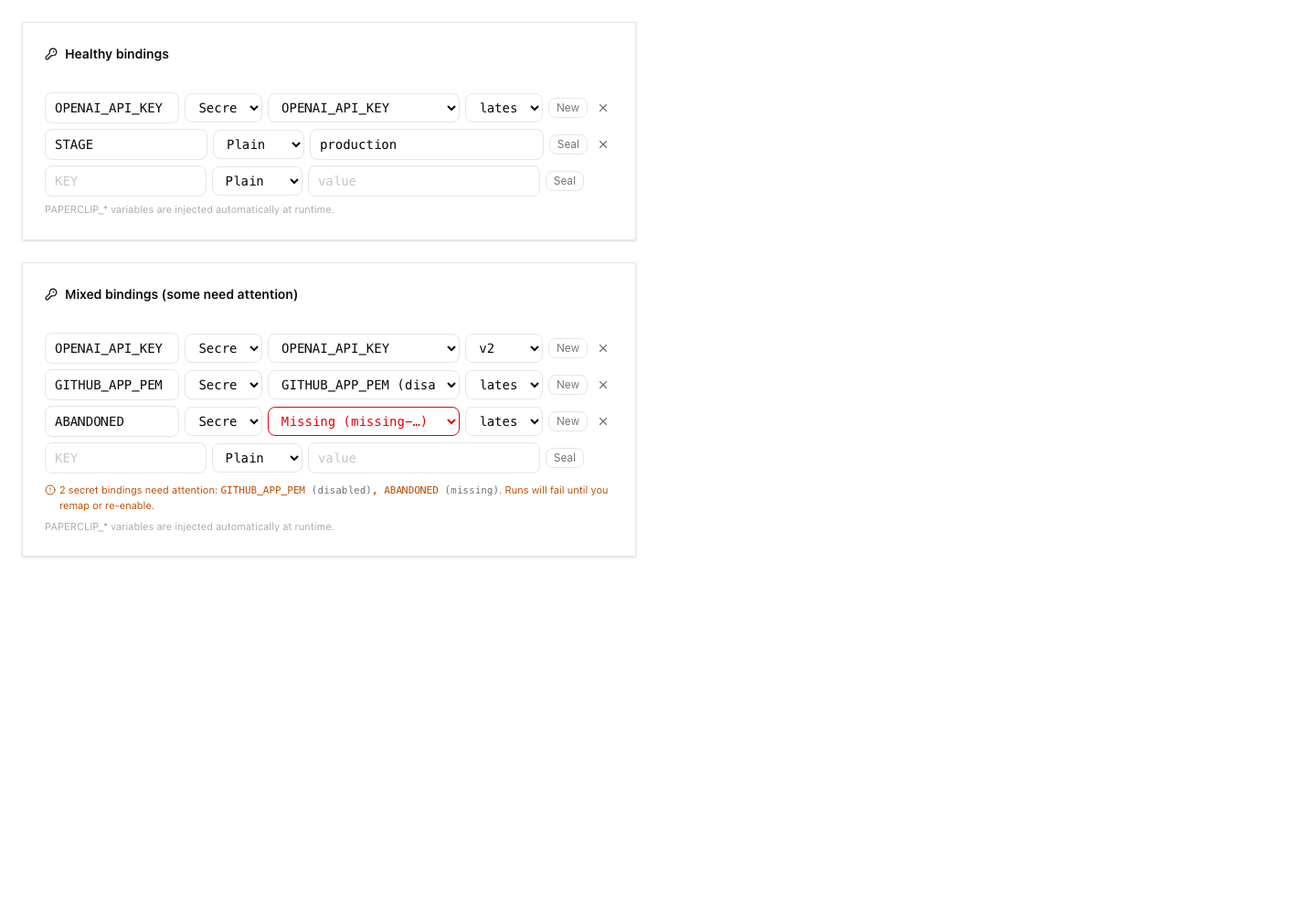
- Added Secrets UI surfaces for vault management and remote import, plus
CLI/API documentation for setup and operations.
- Stabilized routine webhook secret binding paths and SSH
environment-driver fixture bindings discovered during verification.
- Addressed Greptile and CI findings: no lockfile/package drift,
monotonic migration metadata, disabled-vault default races, soft-deleted
secret hiding/recreate behavior, remove behavior with disabled vaults,
soft-deleted external-reference re-import, non-active rotation guards,
managed-secret soft deletion through PATCH, and per-call AWS SDK
credential client churn.
- Rebased this branch onto `public-gh/master` at `0e1a5828` and
force-pushed with lease to keep this as the single PR for the branch.
## Verification
- `git fetch public-gh master`
- `git rebase public-gh/master`
- `git diff --name-only public-gh/master...HEAD | grep
'^pnpm-lock\.yaml$' || true` confirmed `pnpm-lock.yaml` is not in the PR
diff.
- Confirmed migration ordering: master ends at `0081_optimal_dormammu`;
this PR adds `0082_dry_vision` and
`0083_company_secret_provider_configs`.
- Inspected migrations for repeat safety: new tables/indexes use `IF NOT
EXISTS`; foreign keys are guarded by `DO $$ ... IF NOT EXISTS`; column
additions use `ADD COLUMN IF NOT EXISTS`.
- `pnpm -r typecheck` passed before the Greptile follow-up commits.
- `pnpm test:run` ran the full stable Vitest path before the Greptile
follow-up commits; it completed with 3 timing-related failures under
parallel load: `codex-local-execute.test.ts`,
`cursor-local-execute.test.ts`, and `environment-service.test.ts`.
- `pnpm --filter @paperclipai/server exec vitest run
src/__tests__/codex-local-execute.test.ts
src/__tests__/cursor-local-execute.test.ts
src/__tests__/environment-service.test.ts` passed on targeted rerun
(`24/24`).
- `pnpm build` passed before the Greptile follow-up commits. Vite
reported existing chunk-size/dynamic-import warnings.
- After Greptile follow-up commits: `pnpm --filter @paperclipai/server
exec vitest run src/__tests__/secrets-service.test.ts` passed (`26/26`).
- After Greptile follow-up commits: `pnpm --filter @paperclipai/server
exec vitest run src/__tests__/aws-secrets-manager-provider.test.ts
src/__tests__/secrets-service.test.ts` passed (`39/39`).
- After Greptile follow-up commits: `pnpm --filter @paperclipai/server
typecheck` passed.
- Captured Storybook screenshots from `ui/storybook-static` for visual
review.
- Latest PR checks on `5ca3a5cf`: `policy`, serialized server suites
1/4-4/4, `Canary Dry Run`, `e2e`, `security/snyk`, and `Greptile Review`
pass; aggregate `verify` is still registering the completed child
checks.
- Greptile review loop continued through the latest requested pass; all
Greptile review threads are resolved and the latest `Greptile Review`
check on `5ca3a5cf` passed with 0 comments added.
## Screenshots
Before: the provider-vault and remote-import surfaces did not exist on
`master`; these are after-state screenshots from the Storybook fixtures.
## Risks
- Migration risk: this adds new secret provider tables and extends
existing secret rows. The migrations were checked for monotonic ordering
and idempotent guards, but reviewers should still inspect upgrade
behavior carefully.
- Provider risk: AWS support uses direct SigV4 requests. Automated tests
cover signing, request timeouts, vault-config selection, namespace
guardrails, pending-version archival, sanitized provider errors, and
service-level cleanup paths. A real-vault AWS smoke test remains
deployment validation for an operator with AWS credentials rather than
an unverified merge blocker in this local branch.
- UI risk: the Secrets page and import dialog are large new surfaces;
screenshots are included above for reviewer inspection.
- Verification risk: the full local stable test command hit
parallel-load timing failures, although the exact failed files passed
when rerun directly.
- Operational risk: remote import intentionally avoids plaintext reads;
operators must understand that imported external references resolve at
runtime and may fail if AWS permissions change.
> For core feature work, check [`ROADMAP.md`](ROADMAP.md) first and
discuss it in `#dev` before opening the PR. Feature PRs that overlap
with planned core work may need to be redirected — check the roadmap
first. See `CONTRIBUTING.md`.
## Model Used
- OpenAI Codex, GPT-5 coding agent with local shell/tool use in the
Paperclip worktree. Exact context-window size was not exposed by the
runtime.
## Checklist
- [x] I have included a thinking path that traces from project context
to this change
- [x] I have specified the model used (with version and capability
details)
- [x] I have checked ROADMAP.md and confirmed this PR does not duplicate
planned core work
- [ ] I have run tests locally and they pass
- [x] I have added or updated tests where applicable
- [x] If this change affects the UI, I have included before/after
screenshots
- [x] I have updated relevant documentation to reflect my changes
- [x] I have considered and documented any risks above
- [x] I will address all Greptile and reviewer comments before
requesting merge
---------
Co-authored-by: Paperclip <noreply@paperclip.ing>
Co-authored-by: Claude Sonnet 4.6 <noreply@anthropic.com>



203 lines
6.9 KiB
Markdown
203 lines
6.9 KiB
Markdown
# Database
|
|
|
|
Paperclip uses PostgreSQL via [Drizzle ORM](https://orm.drizzle.team/). There are three ways to run the database, from simplest to most production-ready.
|
|
|
|
## 1. Embedded PostgreSQL — zero config
|
|
|
|
If you don't set `DATABASE_URL`, the server automatically starts an embedded PostgreSQL instance and manages a local data directory.
|
|
|
|
```sh
|
|
pnpm dev
|
|
```
|
|
|
|
That's it. On first start the server:
|
|
|
|
1. Creates a `~/.paperclip/instances/default/db/` directory for storage
|
|
2. Ensures the `paperclip` database exists
|
|
3. Runs migrations automatically for empty databases
|
|
4. Starts serving requests
|
|
|
|
Data persists across restarts in `~/.paperclip/instances/default/db/`. To reset local dev data, delete that directory.
|
|
|
|
If you need to apply pending migrations manually, run:
|
|
|
|
```sh
|
|
pnpm db:migrate
|
|
```
|
|
|
|
When `DATABASE_URL` is unset, this command targets the current embedded PostgreSQL instance for your active Paperclip config/instance.
|
|
|
|
Issue reference mentions follow the normal migration path: the schema migration creates the tracking table, but it does not backfill historical issue titles, descriptions, comments, or documents automatically.
|
|
|
|
To backfill existing content manually after migrating, run:
|
|
|
|
```sh
|
|
pnpm issue-references:backfill
|
|
# optional: limit to one company
|
|
pnpm issue-references:backfill -- --company <company-id>
|
|
```
|
|
|
|
Future issue, comment, and document writes sync references automatically without running the backfill command.
|
|
|
|
This mode is ideal for local development and one-command installs.
|
|
|
|
Docker note: the Docker quickstart image also uses embedded PostgreSQL by default. Persist `/paperclip` to keep DB state across container restarts (see `doc/DOCKER.md`).
|
|
|
|
## 2. Local PostgreSQL (Docker)
|
|
|
|
For a full PostgreSQL server locally, use the included Docker Compose setup:
|
|
|
|
```sh
|
|
docker compose up -d
|
|
```
|
|
|
|
This starts PostgreSQL 17 on `localhost:5432`. Then set the connection string:
|
|
|
|
```sh
|
|
cp .env.example .env
|
|
# .env already contains:
|
|
# DATABASE_URL=postgres://paperclip:paperclip@localhost:5432/paperclip
|
|
```
|
|
|
|
Run migrations:
|
|
|
|
```sh
|
|
DATABASE_URL=postgres://paperclip:paperclip@localhost:5432/paperclip \
|
|
pnpm db:migrate
|
|
```
|
|
|
|
Start the server:
|
|
|
|
```sh
|
|
pnpm dev
|
|
```
|
|
|
|
## 3. Hosted PostgreSQL (Supabase)
|
|
|
|
For production, use a hosted PostgreSQL provider. [Supabase](https://supabase.com/) is a good option with a free tier.
|
|
|
|
### Setup
|
|
|
|
1. Create a project at [database.new](https://database.new)
|
|
2. Go to **Project Settings > Database > Connection string**
|
|
3. Copy the URI and replace the password placeholder with your database password
|
|
|
|
### Connection string
|
|
|
|
Supabase offers two connection modes:
|
|
|
|
**Direct connection** (port 5432) — use for migrations and one-off scripts:
|
|
|
|
```
|
|
postgres://postgres.[PROJECT-REF]:[PASSWORD]@aws-0-[REGION].pooler.supabase.com:5432/postgres
|
|
```
|
|
|
|
**Connection pooling via Supavisor** (port 6543) — use for the application:
|
|
|
|
```
|
|
postgres://postgres.[PROJECT-REF]:[PASSWORD]@aws-0-[REGION].pooler.supabase.com:6543/postgres
|
|
```
|
|
|
|
### Configure
|
|
|
|
For the application runtime, use a direct PostgreSQL connection unless the database client has explicit prepared-statement configuration for your pooling mode:
|
|
|
|
```sh
|
|
DATABASE_URL=postgres://postgres.[PROJECT-REF]:[PASSWORD]@aws-0-[REGION].pooler.supabase.com:5432/postgres
|
|
```
|
|
|
|
If you later run the app with a pooled runtime URL, set `DATABASE_MIGRATION_URL` to the direct connection URL. Paperclip uses it for startup schema checks/migrations and plugin namespace migrations, while the app continues to use `DATABASE_URL` for runtime queries:
|
|
|
|
```sh
|
|
DATABASE_URL=postgres://postgres.[PROJECT-REF]:[PASSWORD]@aws-0-[REGION].pooler.supabase.com:6543/postgres
|
|
DATABASE_MIGRATION_URL=postgres://postgres.[PROJECT-REF]:[PASSWORD]@aws-0-[REGION].pooler.supabase.com:5432/postgres
|
|
```
|
|
|
|
If your hosted database requires transaction-pooling-only connections, use a direct or session-pooled connection for Paperclip until runtime pooling support is documented in this guide. Do not edit database client source files as part of deployment setup.
|
|
|
|
### Push the schema
|
|
|
|
```sh
|
|
# Use the direct connection (port 5432) for schema changes
|
|
DATABASE_URL=postgres://postgres.[PROJECT-REF]:[PASSWORD]@...5432/postgres \
|
|
pnpm db:migrate
|
|
```
|
|
|
|
### Free tier limits
|
|
|
|
- 500 MB database storage
|
|
- 200 concurrent connections
|
|
- Projects pause after 1 week of inactivity
|
|
|
|
See [Supabase pricing](https://supabase.com/pricing) for current details.
|
|
|
|
## Switching between modes
|
|
|
|
The database mode is controlled by `DATABASE_URL`:
|
|
|
|
| `DATABASE_URL` | Mode |
|
|
|---|---|
|
|
| Not set | Embedded PostgreSQL (`~/.paperclip/instances/default/db/`) |
|
|
| `postgres://...localhost...` | Local Docker PostgreSQL |
|
|
| `postgres://...supabase.com...` | Hosted Supabase |
|
|
|
|
Your Drizzle schema (`packages/db/src/schema/`) stays the same regardless of mode.
|
|
|
|
## Plugin database namespaces
|
|
|
|
The plugin runtime tracks plugin-owned database namespaces and migrations in `plugin_database_namespaces` and `plugin_migrations`. Hosted deployments that separate runtime and migration connections should set `DATABASE_MIGRATION_URL`; plugin namespace migration work uses the migration connection when present.
|
|
|
|
## Backups
|
|
|
|
Paperclip supports automatic and manual logical database backups. These dumps include
|
|
non-system database schemas such as `public`, the Drizzle migration journal, and
|
|
plugin-owned database schemas. See `doc/DEVELOPING.md` for the current
|
|
`paperclipai db:backup` / `pnpm db:backup` commands and backup retention
|
|
configuration.
|
|
|
|
Database backups do not include non-database instance files such as local-disk
|
|
uploads, workspace files, or the local encrypted secrets master key. Back those paths
|
|
up separately when you need full instance disaster recovery.
|
|
|
|
## Secret storage
|
|
|
|
Paperclip stores secret metadata and versions in:
|
|
|
|
- `company_secrets`
|
|
- `company_secret_versions`
|
|
|
|
For local/default installs, the active provider is `local_encrypted`:
|
|
|
|
- Secret material is encrypted at rest with a local master key.
|
|
- Default key file: `~/.paperclip/instances/default/secrets/master.key` (auto-created if missing).
|
|
- CLI config location: `~/.paperclip/instances/default/config.json` under `secrets.localEncrypted.keyFilePath`.
|
|
- Backup/restore requires both the database metadata and the local master key file; either artifact alone is insufficient.
|
|
- The server best-effort enforces `0600` key file permissions and provider health reports permission warnings.
|
|
|
|
Optional overrides:
|
|
|
|
- `PAPERCLIP_SECRETS_MASTER_KEY` (32-byte key as base64, hex, or raw 32-char string)
|
|
- `PAPERCLIP_SECRETS_MASTER_KEY_FILE` (custom key file path)
|
|
|
|
Strict mode to block new inline sensitive env values:
|
|
|
|
```sh
|
|
PAPERCLIP_SECRETS_STRICT_MODE=true
|
|
```
|
|
|
|
You can set strict mode and provider defaults via:
|
|
|
|
```sh
|
|
pnpm paperclipai configure --section secrets
|
|
```
|
|
|
|
Inline secret migration command:
|
|
|
|
```sh
|
|
pnpm paperclipai secrets migrate-inline-env --company-id <company-id> --apply
|
|
|
|
# direct database maintenance fallback
|
|
pnpm secrets:migrate-inline-env --apply
|
|
```
|
|
|
|
Hosted AWS provider notes live in [SECRETS-AWS-PROVIDER.md](./SECRETS-AWS-PROVIDER.md).
|